Nader Dabit shares demos of Devin building and checking iPhone Duo apps in macOS cloud VMs, with video verification across open, half-folded, and closed states. An iOS team can use the illustrated checks to specify state-preservation requirements, such as retaining a photo when the phone closes during a countdown or reopening a book on the same page.
Practical takeaway
Give agents explicit checks for each fold state and transition, including interrupted actions and state restoration, and require recordings that show the result on both inner and outer screens.
Shengbo Guo and coauthors describe adapting Forum’s architecture and tooling so agents can plan, build, test, inspect live Simulator state, and return recorded verification for engineer approval. An iOS team can isolate prototypes in a separate build flavor and run repeatable stress scenarios before review; Meta reports roughly halving memory use and page faults in one investigated issue.
Practical takeaway
Gate agent completion on tests and recorded visual checks, expose live UI state through tools, and compile prototypes out of production while engineers retain architecture and release decisions.
NatashaTheRobot explains a Claude mod that resolves a requested screen and device against open Xcode projects and previews, calls RenderPreview, and returns a saved PNG with a bezel in the session. An iOS team can use the same preview loop for bounded layout iterations while retaining Simulator or device checks for behavior a static preview cannot establish.
Practical takeaway
Resolve preview and device identifiers from the project, validate tool arguments, and return the rendered image to the agent; keep runtime acceptance checks separate from preview inspection.
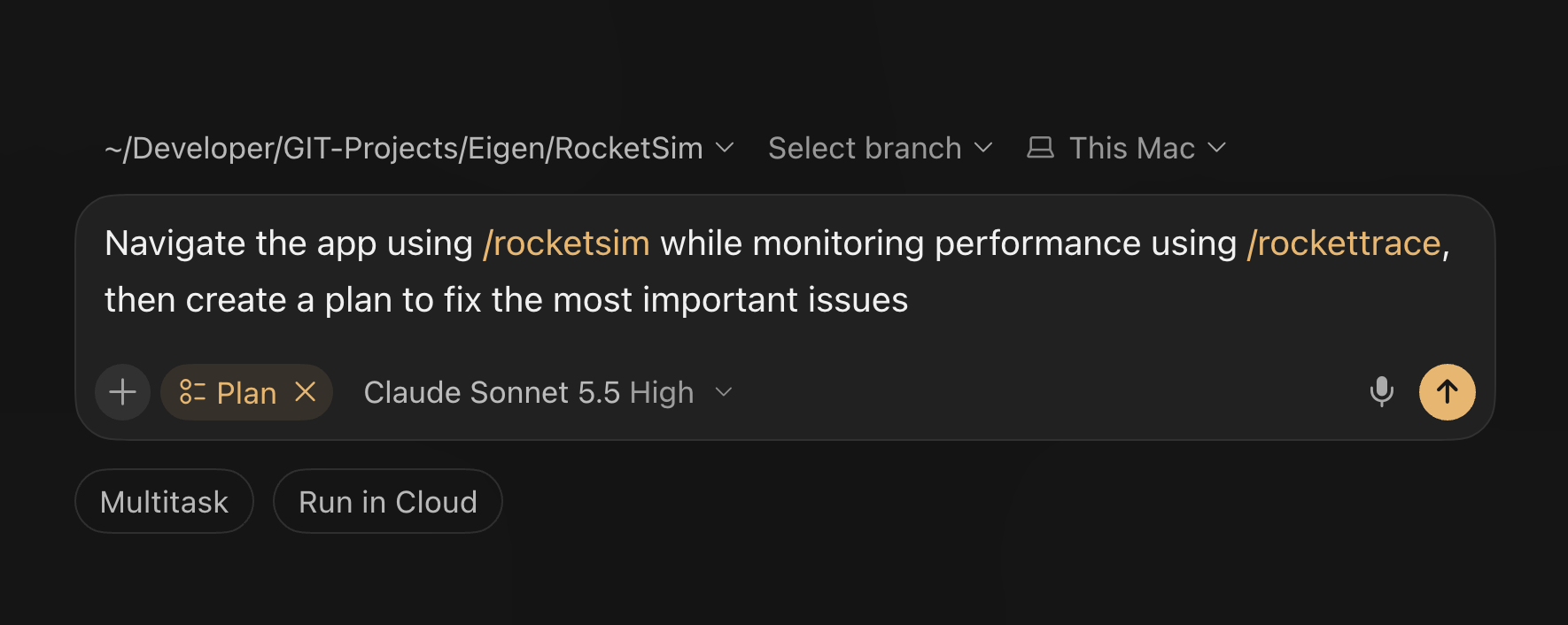
Antoine van der Lee shares four workflows that combine Simulator navigation, accessibility audits, analytics, screenshots, and Instruments findings with a plan reviewed before edits. An iOS team can require evidence for each proposed change and repeat the measurement afterward; his reported accessibility score improved, but device remeasurement of the performance fixes was still pending.
Practical takeaway
Review the audit or trace evidence before approving edits, instrument unattributed hitches instead of guessing, and rerun the same device scenario before claiming a performance improvement.
Amit Kumar argues that AI-generated tests remain constrained by UI-bound logic, singleton dependencies, and nondeterministic state in mature iOS apps. An iOS team can use a feature change to extract one testable boundary, replace clocks or storage, and verify expected outcomes from requirements or known regressions rather than the agent’s own implementation assumptions.
Practical takeaway
Choose one regression-prone feature, make its dependencies controllable, and review refactoring against independent behavior contracts before measuring test speed and reliability.
Low-Future-9387 describes running an iOS app’s Designed for iPad slice as a headless Mac host, with one host per worktree, hot-reloaded views, and compact accessibility checks. The reported speed and memory gains come from one app and one trial per scenario; an iOS team can calibrate representative fixtures against the Simulator and retain device checks for Dynamic Type, transitions, gestures, and the keyboard.
Practical takeaway
Use deterministic SwiftUI fixtures and a host per worktree for quick checks, calibrate render fidelity against the Simulator, and keep a real-device pass for interactions the Mac host cannot exercise.
Paul Hudson shares a three-stage Codex workflow: use subagents for adversarial review, double-check their findings, then present reproduction steps for human verification. For bugs the reviewer confirms, require a failing regression test before fixing and rerunning it; Hudson reports 43 findings so far, with two he disputed.
Practical takeaway
Separate bug discovery from repair: verify reproduction steps yourself, then require a failing regression test and a passing rerun for each confirmed fix.
Software Mansion presents Argent, a toolkit that connects coding agents to mobile apps so they can navigate the UI, inspect runtime state and network requests, and profile performance in the same development session. An iOS team can give its agent a reproducible simulator flow, require screenshots and diagnostic evidence, and review the verified result before accepting a change.
Practical takeaway
Give the agent a reproducible simulator flow and require screenshots, logs, and profiling evidence before a reviewer accepts its changes.
Błażej Kustra compares six mobile stacks using the same notes-app specification, one Claude Opus agent at a time, five follow-up changes, and 32 hidden QA checks. Swift finishes the iOS portion close to React Native, while the separate Kotlin app increases total native delivery time; an iOS team can measure build waits, accessibility, and device behavior separately instead of treating agent minutes as the whole quality result.
Practical takeaway
Benchmark the same bounded specification and follow-up changes with hidden QA checks; separate iOS build waits, Android reuse, accessibility failures, and real-device behavior from total agent time.
Ben Holmes describes a three-person iOS team keeping orchestration and review agents on Linux while a Mac-based implementer builds, exercises the Simulator, and returns screenshots or recordings. Slack makes tasks and design feedback visible to the team, and adversarial review repeats as changes are refined; an iOS team can require both visual evidence and review before accepting a feature, while making prototype exceptions explicit.
Practical takeaway
Keep native build and Simulator verification on a Mac, return screenshots or recordings to a shared review channel, and repeat adversarial review after feedback before accepting a production change.
Joshua Warren reports building an iPhone app on Omarchy Linux, submitting it to the App Store, installing it over USB, and reaching a debugger breakpoint. His thread clarifies that the run used a Dell laptop and that simulator support and full Xcode parity remain unfinished. An iOS team evaluating this path can first match Swift to the extracted Apple SDK, then verify build, signing, device launch, and debugging on a small app.
Practical takeaway
Prove the build, signing, USB install, and debugger loop on a small native app before migrating a project; keep simulator coverage separate from the reported device workflow.
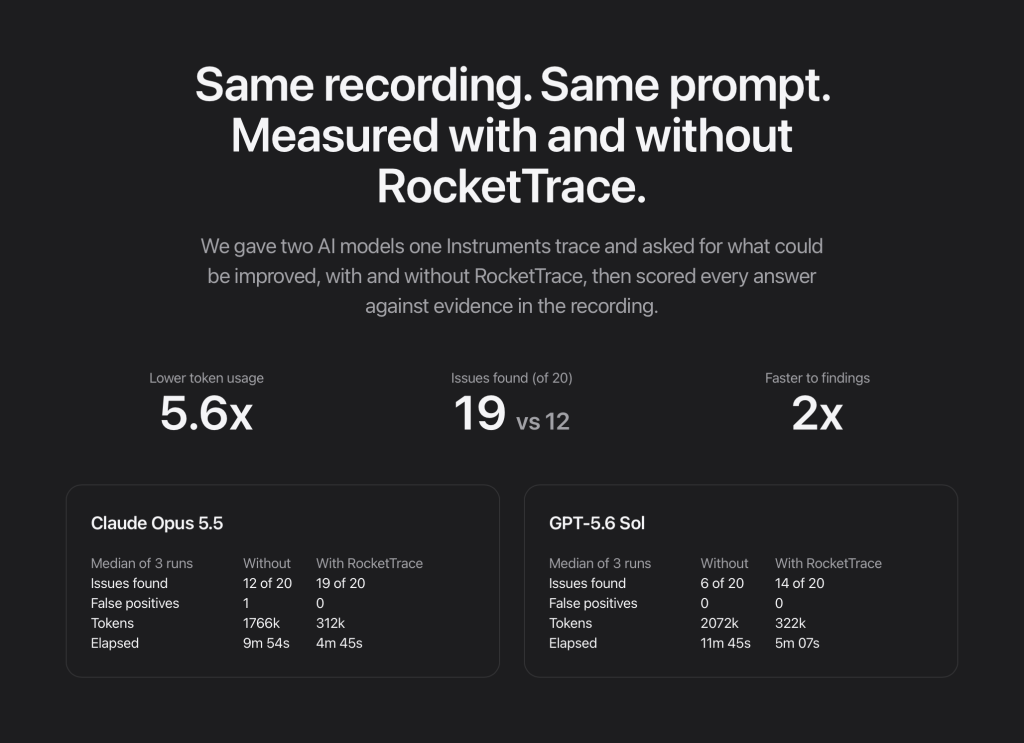
Antoine van der Lee shows how to turn a profile-build Instruments recording into ranked findings, review an agent’s proposed fix, and record again to check the result. His vendor-run benchmark uses one frozen trace, two models, and three runs per model; an iOS team can apply the workflow to its own app while requiring the agent to inspect every finding rather than only the top-ranked ones.
Practical takeaway
Record a fresh profile build, give the agent compact findings with trace evidence, review its plan, and re-record the same flow to verify the fix; require coverage of every finding.
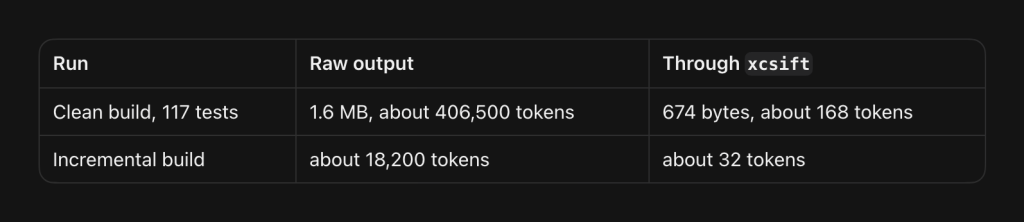
Antoine van der Lee audits 1,674 agent sessions and identifies repeated context reads, duplicate skill loads, and unfiltered build output as major token costs. His measured Xcode-log example preserves warnings and test results while shrinking output; an iOS team can audit its own transcripts, scope instructions, and filter build logs before expanding agent usage.
Practical takeaway
Measure context and build-log costs in your own sessions, scope instructions to the task, and filter Xcode output while preserving diagnostics and test outcomes.
Daniel Hayes Smith reports building ClearTime with Claude Code around a shared Swift package, platform-specific design references, and golden geometry test vectors. His handoff defines which files win when references disagree, while early internal TestFlight builds let him assess behavior on real devices; the reported speed and test totals remain self-reported.
Practical takeaway
Give agents authoritative design references and shared test vectors, define how conflicting files are resolved, and make real-device builds an early human review gate.
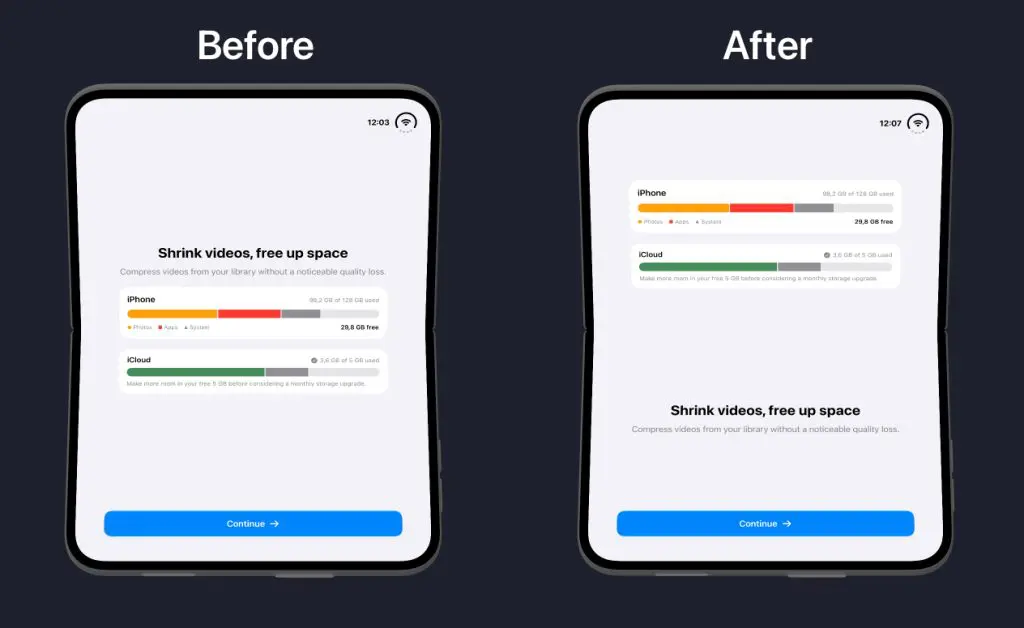
Antoine van der Lee pairs a screen-by-screen SwiftUI agent audit with simulator checks for compact and regular layouts, folding, rotation, and preserved navigation state. His migration example replaces a cramped onboarding layout with an arranged view, while keeping agent suggestions subject to transition testing and real-device checks.
Practical takeaway
Review one screen at a time with explicit layout and state constraints, then test folding, rotation, keyboard, and navigation transitions before accepting the migration.
Paul Hudson compares Codex and Claude through his own Apple-platform development work, favoring Codex for thorough implementation and accessibility while finding Claude useful for design ideas and debugging. He also reports overengineering and instruction-following problems; an iOS team can adopt his briefing process by having the agent question assumptions before committing a detailed plan to source control.
Practical takeaway
Before implementation, have the agent ask clarifying questions, resolve gaps in the brief, and save the agreed plan in source control; explicitly request adversarial review where it can catch meaningful problems.
Cameron Cooke demonstrates TypeSafe AI's Jev paired with AXe to navigate Calendar and create an event in the iOS Simulator from a natural-language prompt. The demo reports 11.6 seconds, six actions, no screenshots, and an estimated $0.0013 cost; Cooke describes the integration as a prototype with bugs and rough edges. An iOS team can use this experiment to define a bounded UI automation benchmark that measures latency, cost, and the resulting app state.
Practical takeaway
Benchmark one repeatable Simulator task with explicit checks of the final app state, and measure total runtime and cost before drawing conclusions from the prototype's reported speed.
Cognition explains how Devin's cloud Mac workspaces combine persistent snapshots, network controls, prepared Xcode environments, and live Simulator access. Devin uses accessibility references to operate native controls and screenshots to check what the tree cannot expose; an iOS team can apply this loop to verify state restoration across pause, quit, and relaunch.
Practical takeaway
Require agents to exercise pause, quit, and relaunch paths, re-read accessibility state after each action, and inspect screenshots for visual or gameplay state missing from the tree.
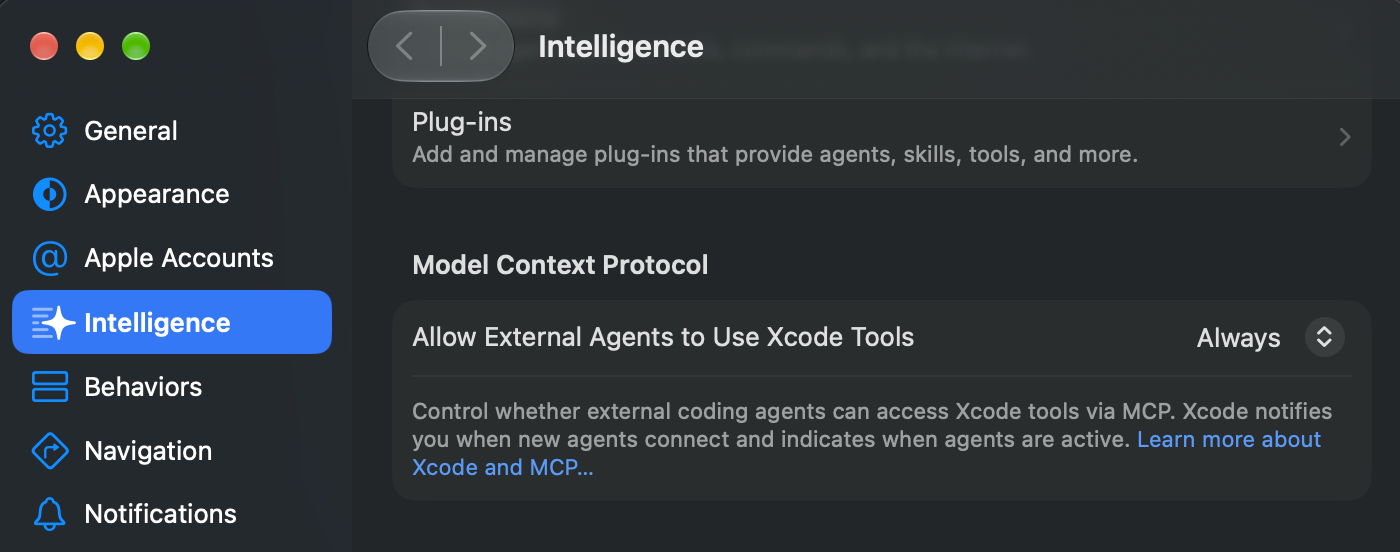
Keremcan Yesildag separates Codex registration, Xcode external-agent access, headless permissions, and project approval while diagnosing an MCP bridge that reports disabled access. His walkthrough verifies the connection with scheme discovery and a focused documentation query before asking the agent to edit a project.
Practical takeaway
Verify project approval and read-only MCP queries independently before debugging code changes; a registered bridge alone does not establish working Xcode access.
Antoine van der Lee demonstrates a focused SwiftUI review that exposes nested scroll containers and duplicated selection synchronization between a view and its view model. He explains how a compact skill routes agents to relevant references, giving teams concrete findings to inspect instead of treating generated SwiftUI as already reviewed.
Practical takeaway
Ask agents to review scroll ownership and state synchronization explicitly, then verify each proposed change against the actual view hierarchy and source of truth.
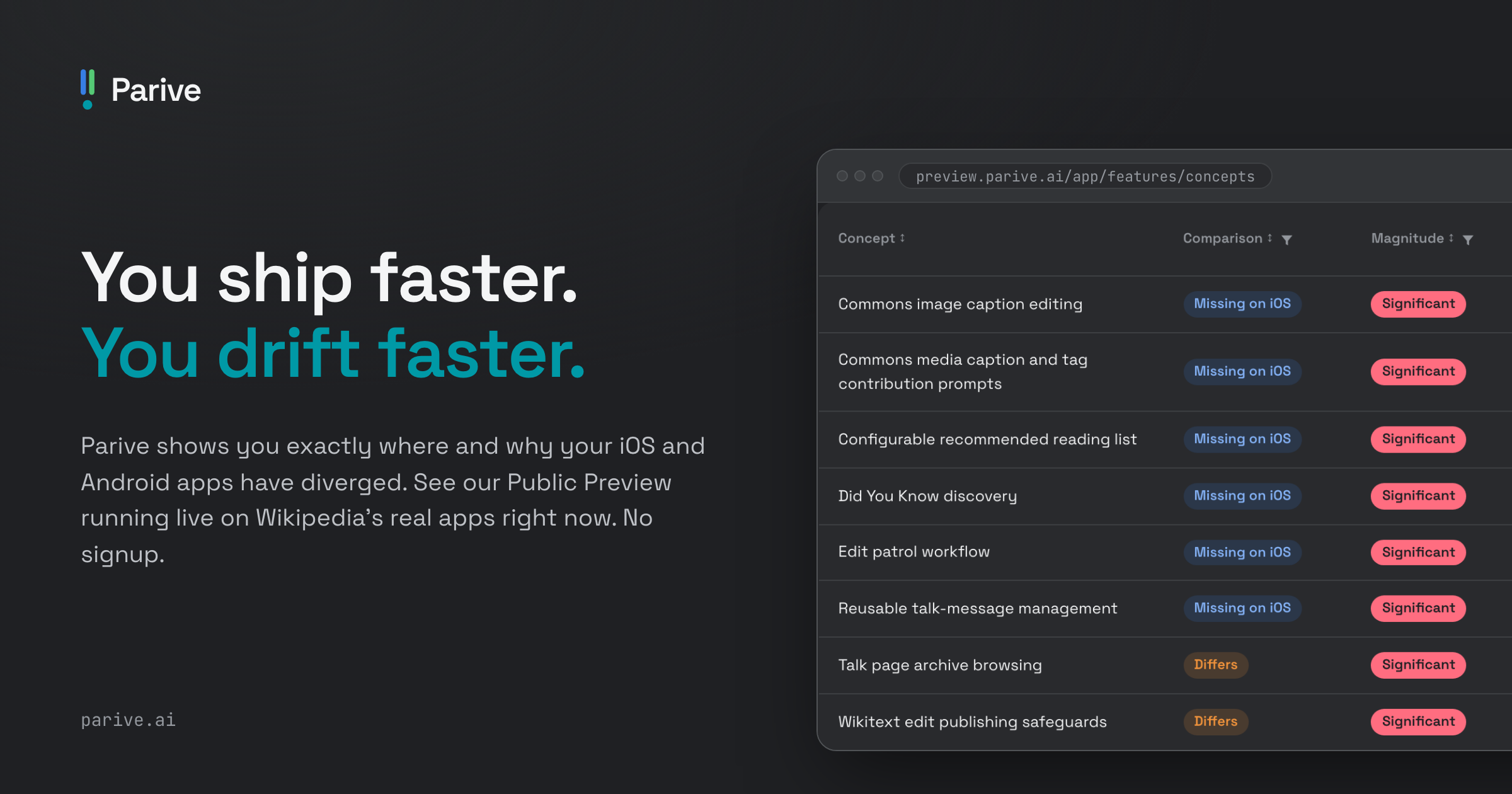
Kevin Galligan argues that an existing native implementation can serve as a detailed specification for an agent building the same feature on the other platform, changing the tradeoffs between native and shared codebases. He describes Parive’s parity analysis and reports a largely automated Swift app port, while stressing project context, verification, and platform specialists. An iOS team can pilot one feature across platforms and verify edge cases, error states, and analytics alignment before expanding the approach.
Practical takeaway
Use the working implementation as the specification for a small cross-platform port, maintain target-platform guidance, and verify behavior and parity before expanding the workflow.
Max Da Silva, Jason Kim, and Quique Fagoaga report rebuilding Shop in Swift and Kotlin in 12 weeks using reviewed migration plans and live app feedback. Plan approvals were tied to content hashes, while named checkpoints compared screenshots and analytics events; an iOS team can apply those checks to preserve sign-in, navigation, and event semantics during a rewrite.
Practical takeaway
Bind approval to the exact migration plan, compare screenshots and event payloads at named checkpoints, and verify user-state continuity before releasing an agent-assisted rewrite.
Mustafa Ali explains how Shopify couples native migration with Helix checkpoints that require tests, visual review, two adversarial reviewers, and human approval before each commit. The team also separates business logic from UI and exposes it through a headless CLI for faster agent feedback; an iOS team can pilot that architecture on one flow before expanding autonomous work.
Practical takeaway
Expose one business flow through a headless CLI, then gate each agent migration checkpoint on behavior tests, visual parity, adversarial review, and human approval before committing.
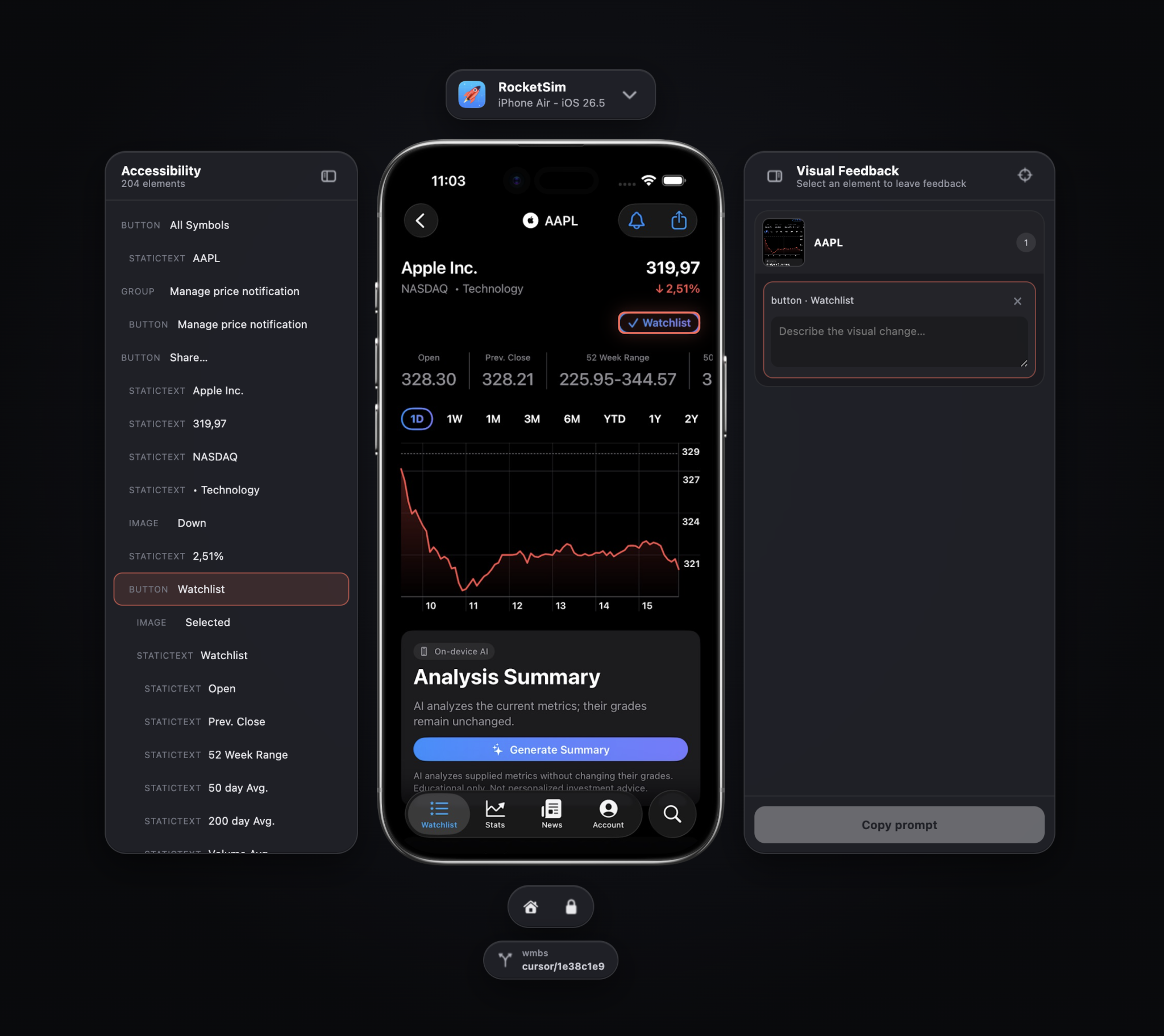
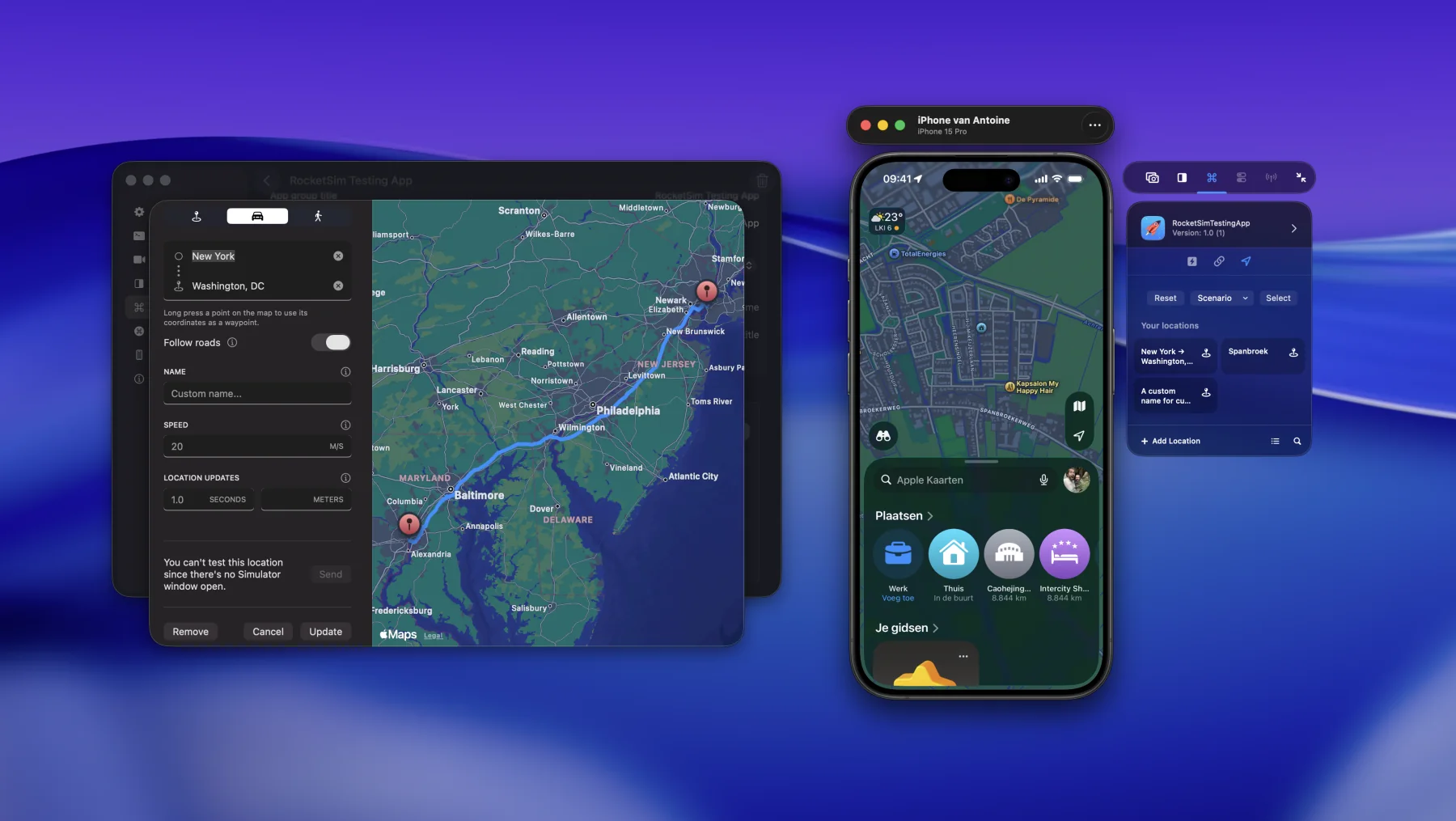
Antoine van der Lee shows how RocketSim 17 streams the iOS Simulator into Cursor, Claude Code, or Codex so an agent can navigate the app while the developer watches. Accessibility hierarchy, browser-side element selection, screenshots, and worktree-aware sessions keep implementation, visual review, and feedback in one context.
Practical takeaway
Keep the Simulator visible beside the agent, identify controls through accessibility data, and turn each visual observation into immediate, contextual feedback before accepting the change.
iCodesign demonstrates a remote iOS feedback loop in which a coding agent packages a completed build, returns a link or QR code, and installs it on an iPhone without a TestFlight upload or processing delay. An iOS team can reserve this path for trusted internal devices and use it to test agent changes on hardware before entering the release pipeline.
Practical takeaway
Close the remote-agent loop on trusted hardware with a direct install link, while keeping signing controls and App Store distribution as separate release gates.
Anshu Chimala presents a discover-define-deliver workflow for escaping generic AI design with divergent seeds, fresh-context critic agents, visual baselines, generated media, and human simplification. An iOS team can give a separate critic screenshots and a fixed rubric, then require the implementer to cross a visual threshold before a designer removes excess and restores native conventions.
Practical takeaway
Separate visual criticism from implementation: score screenshots against a stable rubric, iterate to a threshold, then have a designer simplify the result and restore native iOS conventions.
interlap reports running twelve Claude Code agents, each with its own iOS Simulator, on a 16 GB M1 Pro after stripping unnecessary simulator services; two agents recovered from bad assumptions and completed the task. An iOS team can use the experiment to size isolated simulator workers before scaling parallel QA.
Practical takeaway
Benchmark one isolated simulator worker first, require screenshots and completed-task evidence, then increase concurrency while watching memory, swap, simulator state, and recovery behavior.
Amit Kumar uses Tinder's Xcode 26 case study to show that AI-assisted migrations work when teams first turn compiler, test, snapshot, and tooling failures into bounded buckets, then constrain and validate each patch. An iOS team can pair reproducible builds and target-aware tests with focused human review instead of handing an agent an open-ended upgrade.
Practical takeaway
Before assigning an Xcode upgrade to an agent, bucket failures by target and subsystem, provide local constraints, and require affected-target builds, tests, snapshots, and owner review for every patch.
Kacper Kapuściak demonstrates an AI App Store screenshot generator for Claude Code that uses Argent to explore an iOS app, capture recordings and screenshots, and export upload-ready assets. An iOS team can automate the capture pass while requiring a reviewer to verify device framing, app state, copy, and store compliance before upload.
Practical takeaway
Give the agent deterministic launch states and a required device matrix, then review every exported screenshot for framing, content, localization, and App Store requirements before upload.
Bill Atkins explains how he moved repetitive UIKit and SwiftUI maintenance onto a 24 GB Mac mini running OpenCode, Ollama, and Gemma so Stylebook's proprietary source stays local. An iOS team can route bounded migrations, tests, macros, and crash utilities to local models while requiring explicit permission for anything beyond safe reads.
Practical takeaway
Start local agents with small mechanical Swift tasks, restrict writes and external actions behind permission gates, and compare resource use against cloud models before expanding their role.
soracolor describes turning repeated Codex and Claude Code corrections into a repository-governed iOS delivery harness with worktrees, restartable progress records, self-hosted Mac runners, staged instructions, and explicit human stops before external writes. An iOS team can encode the same boundaries in checks and state rather than relying on conversational reminders.
Practical takeaway
Put non-negotiable stops and resumable state in the repository, serialize external writes, and let agents prepare App Store work while a person retains merge, submission, privacy, and release decisions.
Rudrank Riyam walks through an overnight Codex goal that delegated 99 Apple Ads operations across subagents, opened unmerged pull requests, tested against live credentials, and still required twelve hours because naming and API boundaries were decided late. An iOS team can front-load those decisions and retain explicit review and release gates.
Practical takeaway
Define names and API boundaries before dispatch, keep agent pull requests unmerged, verify real API behavior deliberately, and reserve the final release decision for a human reviewer.
Rork introduces an AI App Store Reviewer that predicts likely App Store rejections and fixes underlying issues before submission, reporting 87% accuracy on the company's internal benchmark. An iOS team can run this as a preflight check while treating its score as an unverified vendor claim and preserving human review.
Practical takeaway
Add an automated App Store policy preflight before submission, but keep its findings advisory until a reviewer confirms each proposed fix against current Apple guidance and the app's actual behavior.
Frederik reverses the conventional small-app design sequence: Codex builds a SwiftUI MVP, he uses it on an iPhone to identify friction, Codex recreates the working screens in Figma, and he refines them before sending the changes back to SwiftUI. An iOS team can use the running product as the first design critique surface.
Practical takeaway
For a bounded feature, build the smallest native flow first, use it on-device, refine the proven interaction in Figma, and only then ask the agent to carry the approved design back into SwiftUI.
Antoine van der Lee explains that RocketSim prepares network requests and responses for an AI assistant only after redacting sensitive values from the export. An iOS team can make that sanitization a required boundary before captured traffic enters an external conversation.
Practical takeaway
Put redaction in the network-log export path, then require a human to review the sanitized prompt before any captured request or response is shared with an AI assistant.
Artem Novichkov demonstrates a headless Xcode 27 beta workflow in which Claude creates a SwiftUI project, renders named preview states, drives an iPhone simulator through accessibility metadata, and checks OSLog evidence without keeping the Xcode UI open. An iOS team can pin the beta per repository, retain individual agent and folder approvals, and require both visual and state-change proof before accepting a run.
Practical takeaway
Keep headless Xcode configuration and exported Apple skills in the repository, approve agents and folders individually, then pair simulator screenshots with accessibility data and OSLog evidence for acceptance.
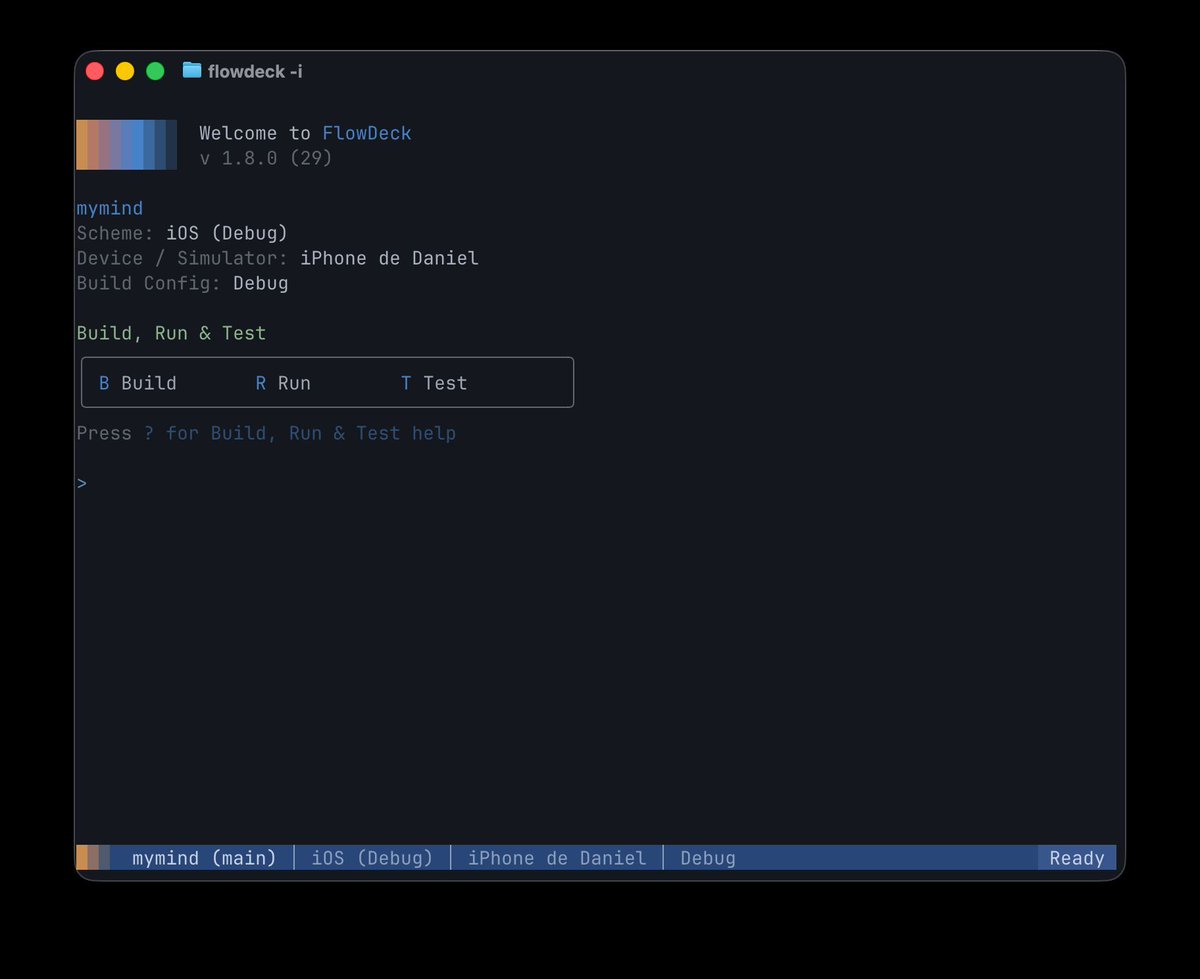
Daniel Bernal reports replacing fragile UI-test authoring for core app journeys with a FlowDeck agent that operates the app and checks those flows while he works elsewhere. The pattern complements unit coverage with delegated, observable end-to-end exercise rather than treating a successful build as proof that the experience works.
Practical takeaway
Keep deterministic unit tests for logic, then give an agent a small set of named core journeys to exercise independently and require observable evidence before accepting the run.
ekzess lays out a recovery plan for an overgrown iOS agent workspace: freeze the repository, map conflicting instructions, establish one authority hierarchy, separate project truth from reusable skills, and define acceptance before implementation. An iOS team can apply the same read-only archaeology before consolidating its agent context.
Practical takeaway
Inventory instructions before deleting them, keep each project fact in one authoritative home, cap agent spawning, and map each change class to explicit build, test, UI, accessibility, performance, and device checks.
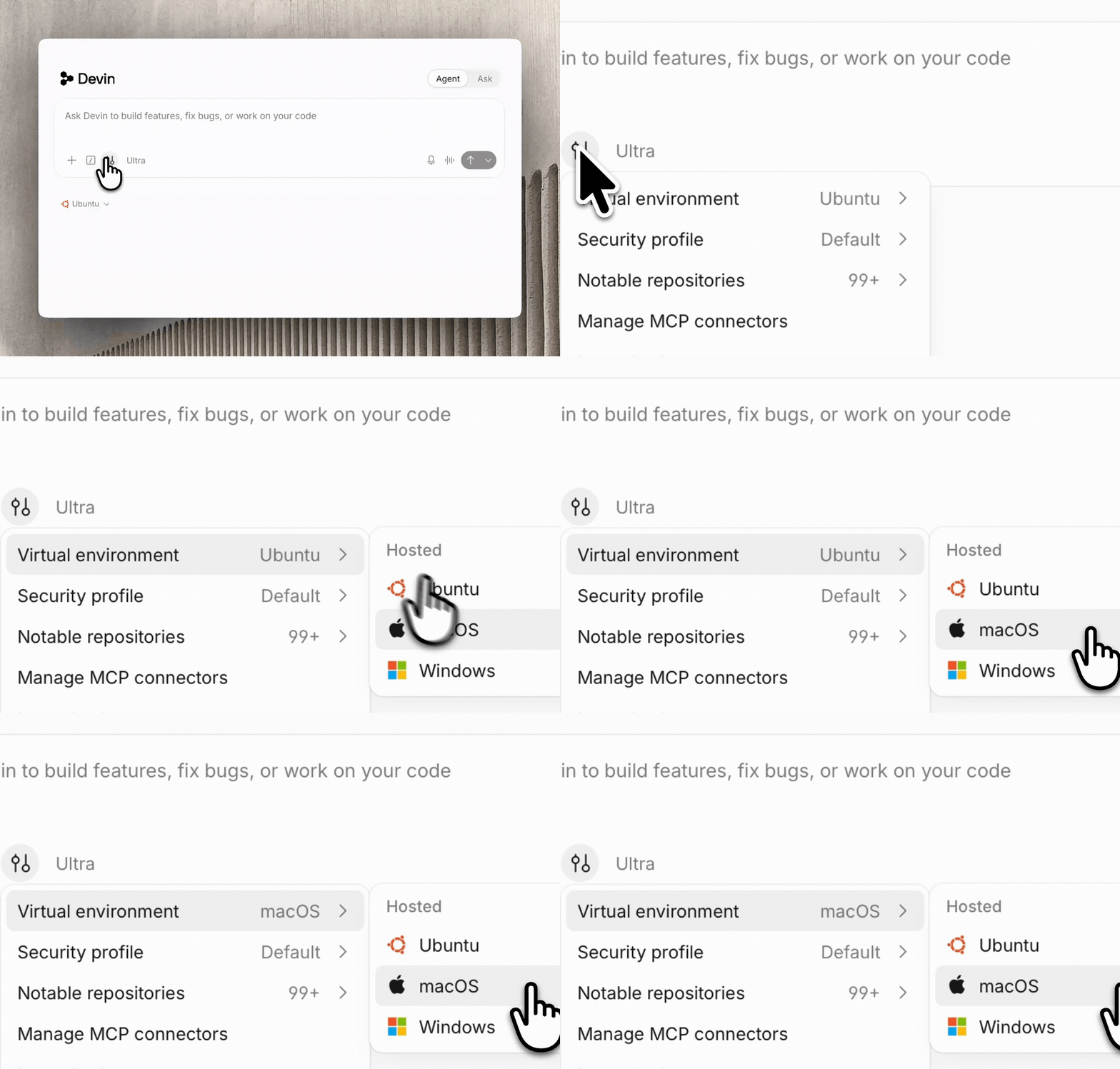
Nader Dabit demonstrates provisioning a clean, real Mac environment for each cloud-agent session with a selected macOS and Xcode version. The recording shows how remote agents can reach the Apple-only build and simulator surface that Linux cloud workers lack.
Practical takeaway
Create a reproducible Mac runner image with pinned macOS and Xcode versions, then require each remote-agent task to build and run in a fresh instance before it can open a PR.
Dom Esposito documents recurring Codex failures where sandboxed GitHub CLI and CoreSimulator access are misdiagnosed as missing authentication or unavailable devices. His repository instructions force explicit host-access decisions and an exact simulator destination discovered from xcodebuild.
Practical takeaway
Record the exact simulator-discovery command and known sandbox failure signatures in AGENTS.md. Grant host access narrowly for the affected build or test command, not as a blanket default.
Cognition demonstrates connecting Devin to a Namespace macOS blueprint, selecting macOS and Xcode versions, and asking the agent to create, build, launch, and play a native iOS game in Simulator. A team evaluating remote agents can reproduce the demo with a pinned cloud-Mac image and retain the build and runtime evidence.
Practical takeaway
Give remote agents a reproducible Mac image with pinned Xcode, then require them to launch and exercise the app in Simulator before reporting success.
Anam Hira shows a cloud coding agent building a mobile change, running it on a cloud device, recording the result, and putting the recording directly into its pull request. The workflow replaces a diff-only handoff with inspectable behavioral evidence.
Practical takeaway
Require a simulator or device recording on every agent-authored UI pull request. Make the recording a review artifact alongside the diff, logs, and automated test result.
Mateusz Dembek presents PropMotion, a Claude Code skill distilled from the 3D animation work behind his shipped Gymscle app. It teaches procedural geometry, physics, lighting, haptics, scene chaining, and fixes for recurring SceneKit failures rather than asking the agent to rediscover them.
Practical takeaway
After shipping a difficult visual feature, extract the reusable implementation pattern and framework failure modes into a project skill, then test that skill on a fresh scene.
Daniel Bernal reports that the same clean build produced 2.2 million tokens through xcodebuild and 121 through FlowDeck, illustrating how raw logs can bury the error an agent needs. An iOS team can benchmark its build-output adapter and retain actionable diagnostics with enough context to debug.
Practical takeaway
Measure the token cost of a representative failing build, then replace raw xcodebuild output with structured diagnostics that preserve the first actionable error.
Landseer Enga demonstrates an iOS Simulator exposed inside a terminal environment, with Claude tapping, editing, and testing an app. The demo targets the environment gap that otherwise leaves terminal-first agents able to edit Swift but unable to observe native behavior.
Practical takeaway
Evaluate simulator tooling with one full acceptance flow: launch, navigate, edit state, capture evidence, and detect a deliberate regression. Do not judge it from build success alone.
Mumo iOS Designer describes a workflow where Claude Code or Codex generates native motion, ProKinetic renders it, and tunable values appear as live controls. A human adjusts timing and feel at native refresh rates, then exports the chosen parameters back to the agent and source files.
Practical takeaway
Expose spring, duration, delay, and damping values as live controls. Let the agent create the animation structure, but require a human to tune and approve the final motion on-device.
Rajat S. Lakhina argues that simulator access is useful only when an app exposes a named, deterministic, and screenshot-safe launch state. His companion Swift package models frozen clocks, seeded fixtures, explicit scenario failures, and a pre-render safety audit, while candidly noting that its demo was not exercised in Simulator during the repository session. A team can pilot one debug-only scenario before opening broader app flows to an agent.
Practical takeaway
Add one debug-only launch scenario with seeded data and a frozen clock; reject unknown or screenshot-unsafe fixtures before the app renders, then verify the contract in your own Simulator loop.
Malte Hedderich reports that Codex can drive an iPhone Simulator, tap through flows, inspect screenshots, and rebuild when something breaks. His attempt at fully autonomous goal-driven construction was not good enough, so he returned to explicit specification, planning, task breakdown, and separate human-directed design work.
Practical takeaway
Keep simulator operation automated, but split product work into specification, plan, tasks, and implementation. Provide approved wireframes and colors before asking the coding agent to build UI.
John Sundell and Gui Rambo examine the tradeoffs of using AI assistants and agents in open-source work, then compare how unit testing on Apple platforms has evolved through XCTest and Swift Testing. An iOS team can use the discussion to define where agent-generated contributions require maintainer review and which behaviors must remain protected by tests.
Practical takeaway
Pair an explicit policy for AI-assisted open-source contributions with tests that protect observable behavior, keeping maintainers accountable for every accepted change.
Antoine van der Lee presents a version-matched RocketSim CLI and Agent Skill that let coding agents inspect and operate Simulator, while RocketSim 16 adds a narrower set of repeatable actions for USB-connected devices. An iOS team can pilot one acceptance flow in Simulator, then move only supported checks—such as deep links, locales, or locations—to real hardware.
Practical takeaway
Separate simulator and device capabilities explicitly, and require compact UI evidence plus actionable failures instead of treating compilation as verification.
Cameron Cooke shows an agent using XcodeBuildMCP to add weather-alert controls, rebuild the app, diagnose a logic error, and visually check the resulting interface on an iPhone. An iOS team can pilot the same loop on a bounded feature and require build, runtime, and UI evidence before accepting the change.
Practical takeaway
Give an agent one bounded feature, then require it to build, launch, debug, and visually verify the result rather than stopping at generated Swift code.
Donny Wals argues that agentic development can make apps more bloated and less connected to user needs because adding features has become so inexpensive. The old scheduling question, whether an idea deserves weeks of work, is being replaced by whether it can be shipped in a day or two.
Practical takeaway
Add a product-value gate before agent implementation: name the user problem, success signal, and feature to remove or defer. Low implementation cost is not evidence that a feature belongs.
Artem Novichkov describes using agents on production iOS work at Salmon, with repository instructions, Apple documentation, build and simulator tools, and Jira, Figma, and backend context. An experienced team can begin by documenting one feature's constraints, giving the agent an executable validation loop, and keeping the developer accountable for every resulting bug.
Practical takeaway
Treat context, tools, and integrations as one system: supply the requirement and design sources, then require a build, simulator check, and human code review.
Rudrank Riyam describes evolving App Store Connect CLI into a tool whose agents triage issues and pull requests, implement fixes, audit those fixes, and cut releases. He also outlines a feedback loop where usage analytics identify points of agent friction and a separate verification agent checks improvements before release.
Practical takeaway
Start with one closed maintenance loop: convert a recurring support failure into an issue, let an agent propose the fix, require an independent audit, and release only after the existing checks pass.
Paul Hudson shares a prompt for making a coding agent attack edge cases, malformed inputs, races, boundaries, exhaustion, corrupted state, and invalid assumptions, while removing redundant tests and preserving regressions for bugs found. An iOS team can apply the sweep to one mature test target, then review whether each generated test exercises meaningful behavior rather than implementation trivia.
Practical takeaway
Ask agents to challenge both production code and the test suite: every test should prove distinct behavior, every discovered bug should gain a regression case, and the suite must finish cleanly.
Ntive Labs, Inc. presents Parive’s source-traceable comparison of native iOS and Android behavior, using Wikipedia’s apps to distinguish intentional divergence from overlooked parity gaps. The public preview is a frozen analysis snapshot; planning and implementation agents are shown only in private demos. An iOS team can review the evidence behind each difference and approve a repair plan before accepting code and parity tests.
Practical takeaway
Classify platform differences as intentional, pending, or accidental, verify each finding against source, and approve a repair plan before reviewing the resulting code and parity tests.
Matt Corey reports that Codex completed an automated, UI-test-driven App Store screenshot run in two and a half hours, but every iPad capture showed the app windowed rather than full-screen. The automation completed its steps while missing a presentation constraint obvious during human review.
Practical takeaway
Add machine-checkable screenshot preconditions for device class, orientation, window mode, scale, and safe area. Review one sample per target before allowing a long batch to continue.
Oleh Veheria separates machine-checkable iOS work such as module scaffolding, test generation, and repetitive migrations from decisions that stay human, including architecture, concurrency, dependencies, and releases. He argues that fast Swift Package Manager build loops and an explicitly measured review process matter more than initial agent setup.
Practical takeaway
Write a two-column trust boundary for the team. Give agents only work whose intent and correctness are machine-checkable; baseline review-cycle time before rollout and measure it again after one week.
Daniel Bernal shows Codex running a scroll-performance UI automation pass while the app repeatedly scrolls on a connected iPhone and the agent monitors the run. An iOS team can turn one performance-sensitive scrolling path into a repeatable agent-operated check and preserve the measured result for review.
Practical takeaway
Automate a representative scrolling path on a real target, capture its performance result, and make that evidence part of the agent’s completion criteria.
Rudrank Riyam reports using GPT 5.6 Sol for long-running engineering lanes that triage pull requests, respond to review, wait for CI, merge, release, and verify live state across iOS apps and developer tools. An iOS team can pilot the approach on one disjoint lane, define what good and no proven regression mean, and judge success by whether the final report still matches raw evidence hours later.
Practical takeaway
For unattended work, assign disjoint lanes, document invariants, require current-state and live-result proof, and accept an honest no-regression finding instead of demanding a patch.
onevcat introduces sim-use, a command-line tool that turns an iOS Simulator or Android screen into a compact representation an agent can understand and exposes commands for operating interface elements. The goal is to make verification part of the agent’s plan-code-verify-ship loop rather than a human-only handoff.
Practical takeaway
Give the agent both a structured accessibility snapshot and deterministic interaction commands. Test the loop on a known flow with one intentional UI failure before trusting autonomous verification.
Anshu Chimala explains an AI-assisted pipeline that turns generated food images into groomed Gaussian splats for a native iOS calorie tracker. He reports replacing separate MTKViews with one full-screen CAMetalLayer and optimizing point sorting to raise performance from roughly 10 to 120 FPS; an iOS team can profile asset generation and rendering as one system before choosing its view architecture.
Practical takeaway
Profile generated assets on-device early; if separate render views create unacceptable overhead, test a shared Metal layer and measure culling, sorting, memory, and frame rate together.
Anshu Chimala recounts how an agent's gesture-driven SwiftUI transition accumulated preference keys, geometry readers, custom layout, and visible handoff defects before being rewritten in UIKit. An iOS team can treat repeated Simulator failures as a signal to reconsider the UI architecture instead of layering on more agent-generated workarounds.
Practical takeaway
When a custom SwiftUI interaction keeps producing visual handoff defects, stop adding workarounds and test whether a more explicit UIKit architecture gives the agent clearer control.
Daniel Bernal demonstrates capturing an iOS animation as a sequence of frames and assembling them into a contact sheet an agent can inspect. An iOS team can use the same artifact to make timing, continuity, and intermediate visual states reviewable instead of asking a model to infer motion from one screenshot.
Practical takeaway
Convert important animations into ordered frame sheets so agents and reviewers can inspect intermediate states, not just the first and final screen.
Matt Gallagher describes using an Xcode agent to audit hundreds of SwiftUI Previews whose mock data and services had decayed after years of slow or unreliable preview builds. The agent turns a large, repetitive maintenance backlog into an opportunity to restore a useful visual-development surface.
Practical takeaway
Inventory every Preview target, repair stale mocks in small batches, and record the build result. Once healthy, run the same audit periodically so preview failures stop accumulating silently.
Anshu Chimala describes starting a native calorie tracker in an empty folder with Claude Code and Fable, then directing the agent to operate Simulator, record interactions, extract frames, and inspect pixel differences while polishing transitions. An iOS team can set frame-level visual acceptance criteria and require inspection artifacts before approving custom motion.
Practical takeaway
Tell the agent to operate Simulator and verify every transition frame by frame, then require recordings, extracted frames, and pixel-level inspection evidence before approving polished motion.
New_Leader_3644 introduces Loupe, a Swift command-line tool that exposes native view properties, accessibility structure, application state, traces, logs, hit testing, screenshots, and runtime probes to coding agents. The author positions that app-side evidence as a complement to simulator-control tools, which can show a screen without explaining its runtime structure.
Practical takeaway
When a screenshot is ambiguous, capture the accessibility tree, native component properties, hit-test result, logs, and app state together. Ask the agent to cite that evidence in its diagnosis.
Antoine van der Lee profiles an AI-generated Swift wallpaper app whose correct-looking output hides hangs, actor-isolation bottlenecks, and unnecessary suspension points. An iOS team can use Instruments to measure each concurrency change, compare release-build traces, and reject generated code that compiles but does not meet performance expectations.
Practical takeaway
Treat Instruments traces as acceptance evidence for AI-written concurrency code; verify hangs, task lifetimes, actor isolation, and queue behavior before shipping.
Vivian Qu, a Meta iOS engineer, explains why mobile agents struggle with proprietary toolchains, fragmented device targets, incomplete platform context, and slow verification. Her central prescription is a scoped plan plus a build-run-inspect loop that gives the agent simulator, interaction, screenshot, and test evidence.
Practical takeaway
Start with one simulator device and OS pair. Give the agent commands to build, launch, interact, capture screenshots, and rerun tests; require that evidence in every PR before expanding the device matrix.
Cameron Cooke distinguishes Xcode MCP’s IDE-facing documentation, preview, and navigator capabilities from XcodeBuildMCP’s runtime automation, debugging, simulator management, and UI control. An iOS team can map each integration to the stage it serves and combine them only where the workflow needs both layers.
Practical takeaway
Separate coding-time IDE assistance from build-and-runtime automation, then give agents only the integrations required to close the specific development loop.
Cameron Cooke demonstrates how an AI agent can use XcodeBuildMCP to build, launch, inspect, interact with, debug, and verify native iOS and macOS apps from its coding environment. An iOS team can reproduce the workshop against a small app and require Simulator evidence instead of stopping at compilation.
Practical takeaway
Give the agent one complete native feedback loop—build, launch, interact, inspect, and verify—and require observable Simulator evidence before accepting its work.
Antoine van der Lee demonstrates an agent using RocketSim’s CLI and bundled skill to inspect, tap, type, navigate, check accessibility, and recover from changed Simulator state. An iOS team can adopt the compact screen protocol for one end-to-end flow and compare completion time, wrong actions, and token use against its current automation path.
Practical takeaway
Give agents structured Simulator state and interaction feedback, then require them to verify the resulting screen instead of trusting coordinates or compilation alone.
Antoine van der Lee explains how RocketSim keeps Simulator context in its Mac app and returns compact, structured output for agent-driven reads and interactions. An iOS team can reproduce the article’s task suite—including nested navigation, duplicate labels, off-screen controls, stale state, and web login—and measure reliability and context cost before adopting it.
Practical takeaway
Benchmark Simulator tools on difficult, repeatable flows and record wall time, output size, token estimates, wrong taps, failures, and recovery—not polished demos alone.
Daniel Bernal argues that agents fail on native iOS projects less because of model capability than because Apple’s CLI tools expose noisy builds, fragmented device control, limited visual state, and hard-to-filter logs. An iOS team can provide structured build and test events, Simulator accessibility state, and scoped logs before evaluating model upgrades.
Practical takeaway
Fix the feedback loop before changing models: provide structured builds and tests, visible Simulator state, and logs scoped to the app under test.
Matheus Gois describes how DoorDash’s iOS platform team encoded a repeatable XCTest-to-Swift-Testing migration in Cursor rules, connected build and test commands through SweetPad and MCP, and kept module ownership with individual teams. Reliability gates, including repeated clean runs, turned a broad migration into bounded work that agents could verify.
Practical takeaway
Pilot one module with a repo rule that maps XCTest APIs to Swift Testing, includes the exact build/test commands, and requires three clean runs. Let the module owner review behavior before rolling it out.
Simon B. Støvring documents a vendor-neutral way to supervise Codex, Claude Code, and other terminal agents from an iPhone: Tailscale secures access to the Mac, tmux preserves sessions, an SSH client resumes them, and push notifications signal when human input is needed. An iOS team can adopt the same pattern while limiting remote login and keeping approvals with the developer.
Practical takeaway
Keep agents running in persistent Mac sessions, notify the developer only when attention is needed, and secure mobile supervision behind account-limited remote access and a private network.
JP Simard connects his history in Swift tooling and mobile infrastructure with Ramp’s small native teams and emerging cross-platform agent workflows. The conversation argues for architecting a feature once and using shared domain context to produce distinct native implementations instead of forcing a single cross-platform codebase.
Practical takeaway
For the next cross-platform feature, write one platform-neutral brief covering behavior and domain rules, then have iOS and Android agents produce separate native implementations reviewed by each platform owner.
Donny Wals describes replacing noisy direct calls to xcodebuild, simctl, and devicectl with a configured CLI that returns structured build errors, streams logs, and writes Simulator screenshots plus accessibility trees. An iOS team can encode its preferred build-run-test path in a skill and AGENTS.md, while retaining human review for whether the UI actually feels right.
Practical takeaway
Make one low-noise build and Simulator path the agent default, require a successful build and functional UI check before review, and reserve visual taste for a person.
Blake Crosley turns lessons from eight shipped iOS apps into a detailed agent workflow covering MCP build access, project context, hooks, testing, architecture, and failure boundaries. An experienced team can start by blocking agent writes to .pbxproj, documenting the exact scheme and simulator commands, and requiring structured build-and-test evidence before review.
Practical takeaway
Add one deterministic guard before expanding agent autonomy: block writes to .pbxproj and require the agent to return the exact build, test, and simulator evidence used to verify each change.
Daniel Bernal walks through a one-prompt exploratory QA run in which Claude Code captured every screen, navigated core flows, found and fixed an index bug, retested it, and reported UX observations. An iOS team can reserve this loop for exploratory end-to-end validation while retaining unit tests and critical XCUITest coverage.
Practical takeaway
Use autonomous UI exploration to find state, edge-case, and UX failures, but keep deterministic tests for critical regression paths and review the agent’s report.
Daniel Bernal reports adding accessibility identifiers to every view so his agent could address interface elements by stable IDs instead of inferred pixel coordinates, moving its UI control from approximate to exact. An iOS team can make identifiers part of view completion and validate that agent-operated flows resolve them deterministically.
Practical takeaway
Treat accessibility identifiers as agent-facing interface contracts and require new views to expose stable IDs before automated UI work begins.
Rudrank Riyam contrasts Xcode Cloud’s unattended, push-triggered pipeline with a local release loop that resolves the next build number, archives and exports in Xcode, uploads the IPA, and distributes it through TestFlight. An iOS team can commit the workflow, validate and dry-run it, and pass structured outputs between steps so agents never need to scrape logs.
Practical takeaway
Keep cloud CI for unattended branch builds, but encode the local ship-now path as a validated, versioned workflow with structured outputs and an explicit TestFlight handoff.
Hesham Salman documents a five-step verification skill: a human confirms success criteria, the agent builds and launches, inspects screenshots and the accessibility hierarchy, checks logs and accessibility, then produces a structured report with video evidence. He explicitly limits it to observable screen state rather than claiming it replaces unit or end-to-end tests.
Practical takeaway
Before the agent builds, have it propose observable acceptance criteria for human approval. Require a report that maps every criterion to a screenshot, hierarchy evidence, logs, and a clear pass or fail.
Paula gives a production account of using Claude Code to create a SpriteKit token celebration in minutes and an origami-like card-folding interaction in about an hour. The agent lowered the cost of exploring polished motion, while she supplied the product intent and iterated on the physical feel before shipping it in Tolan.
Practical takeaway
Time-box one ambitious interaction prototype with an agent, compare it with the simple fallback, and keep it only after a human reviews timing, interruption behavior, accessibility, and maintainability.
Paul Hudson presents an Agent Skills package that reviews AI-written SwiftUI for modern API use, performance, accessibility, concurrency, design, and project hygiene. An iOS team can install the skill at project scope, run it against a representative screen, and turn accepted findings into review rules without treating generated guidance as a substitute for engineering judgment.
Practical takeaway
Give coding agents current, reviewable SwiftUI guidance, then validate suggested API, accessibility, and performance changes against the app's requirements and deployment target.
Rudrank Riyam combines an idempotent App Store Connect CLI setup with RevenueCat’s MCP so an agent can create the store-side subscription first, pass the shared product identifier forward, and configure entitlements, offerings, packages, and a paywall. An iOS team can automate one sandbox product while retaining the JSON output and read-back verification as audit evidence.
Practical takeaway
Keep Apple's billing configuration and RevenueCat behavior as separate stages joined by one product ID, and require each automated stage to read back the state it created.
Steve Troughton-Smith recounts a month using Codex to prototype UIKit apps, migrate Objective-C to Swift, port iOS projects to Android and Windows, resurrect a Unity game in SpriteKit, and debug an unfamiliar production codebase. An iOS team can emulate his safest pattern by giving the agent a handwritten source of truth and style rules, iterating with screenshots, and keeping human taste in control of the result.
Practical takeaway
Use existing native code, project templates, style guidance, and screenshots as strong context; treat agent output as accelerated implementation that still depends on human direction and taste.
Daniel Bernal reports using Codex with FlowDeck for six months: the agent writes code, catches build errors, launches the app, inspects the Simulator UI, and fixes its work while Xcode remains installed but unopened. An iOS team can turn that loop into explicit build, run, inspect, and correction gates.
Practical takeaway
Standardize the agent’s build, run, and Simulator-inspection commands, then require it to observe and correct the running app before handing work to a person.
Donny Wals lays out a delivery loop in which living agent instructions and reviewed plans guide implementation, automated review and CI guard the pull request, and each merge produces a TestFlight build. An iOS team can start by codifying existing conventions, requiring green tests and human device review, then automate the archive-and-upload step once those gates are dependable.
Practical takeaway
Build layered evidence into the path to TestFlight: reviewed plans, local tests, human code and device checks, independent PR review, CI, and a final release build.
Vova Ignatov reports that eight months of daily agent use on Anytype's production iOS app more than doubled his tracked output, attributing the change to reviewed, codebase-specific skills, detailed task context, isolated worktrees, and simulator evidence rather than exotic tooling. Experienced iOS teams can start with one recurring task, document each agent mistake in a focused skill, and require code review plus simulator proof before expanding autonomy.
Practical takeaway
Pick one recurring iOS task and run a correction loop: brief it with existing patterns, review every line, verify in the simulator, and turn each new failure mode into a reviewed skill.
Rudrank Riyam documents Thomas Ricouard giving Codex access to an agent-readable App Store Connect CLI and reaching external TestFlight review in under two minutes, including compliance, group creation, metadata, and submission. An iOS team can reproduce the pattern by exposing explicit flags, structured output, clean exit codes, and a reviewable release workflow rather than bespoke chat integrations.
Practical takeaway
Make release automation self-describing for both humans and agents: expose explicit commands, machine-readable state, deterministic failures, and an auditable path from signed build to TestFlight review.
Muxin Tian and collaborators evaluate 22 agent-model configurations in SWE-Bench Mobile using realistic tasks drawn from a production mixed Swift and Objective-C codebase, including multimodal requirements and comprehensive tests. The best configuration solved only 12 percent of tasks, and the same model varied by as much as sixfold across agent harnesses.
Practical takeaway
Turn 20–50 closed iOS issues into a private benchmark with tests and manual acceptance checks. Replay it whenever the model or agent harness changes, and compare solved-task and regression rates.
Matt Gallagher’s early field notes identify concrete integration failures in Xcode’s MCP tools: schema incompatibility with OpenCode, repeated authorization in Claude Desktop, navigator paths diverging from disk paths, confusing tab identifiers, unreadable update diffs, and test-list output that can overwhelm context.
Practical takeaway
Add a smoke-test script for tool schema, authorization, path identity, diff readability, and test filtering before adopting an Xcode agent. Record unsupported calls so the agent avoids them.
JP Simard reports that Ramp built CI infrastructure to migrate roughly 80 instances of a legacy architectural pattern in its iOS app, completed the migration in two weeks, and then measured a threefold reduction in affected-user crash rate. An iOS team can use agents for a similarly bounded migration after defining the target pattern, automated checks, and outcome metrics.
Practical takeaway
Turn recurring legacy patterns into a bounded, measurable migration: enumerate every instance, automate verification in CI, merge incrementally, and compare production stability before and after.
Thomas Ricouard describes a collective shift from using AI for isolated code completion to supervising multiple agents that can carry substantial programming work in parallel. An iOS team can use that claimed tipping point as a prompt to redesign review capacity, ownership, and engineering judgment around faster code generation rather than assuming more output automatically creates more value.
Practical takeaway
When implementation throughput rises, redesign the human side of the system—review, product judgment, accountability, and prioritization—before multiplying agent lanes.
Pedro Piñera documents giving Codex a production Mastodon iOS project to migrate to Tuist, where it repaired target boundaries and a runtime Objective-C linking failure before verifying the app in Simulator. An iOS team can baseline the original, require build-and-launch parity, and benchmark caching only after runtime validation; Tuist reports clean builds falling from 110.8 to 22.3 seconds in this case.
Practical takeaway
For agent-led project migrations, preserve a working baseline and gate completion on launch behavior—not compilation—before measuring build-performance gains.
Antoine van der Lee distills SwiftUI state, composition, performance, accessibility, modern API, and Instruments trace guidance into progressively loaded agent references. An experienced team can use its trace tooling on one known hitch, then review the structured hang, main-thread, and SwiftUI invalidation evidence before accepting an agent-proposed fix.
Practical takeaway
Give the skill one known SwiftUI hitch and require a narrow Instruments capture; accept a fix only when the structured trace identifies the same main-thread or invalidation cause.
Rudrank Riyam shows that Xcode’s app bundle contains Markdown guidance for frameworks such as Foundation Models, AlarmKit, and Liquid Glass that can be supplied to external coding agents. An iOS team can inspect the bundled files for useful generation patterns, but should check every API and deployment claim against current first-party documentation because the video identifies stale details in the files.
Practical takeaway
Use Xcode's bundled Markdown as local agent context, not unquestioned truth; verify versions, availability, and deprecated APIs before accepting generated code.
JP Simard argues that coding agents make translation between web, Android, and native iOS implementations cheap enough to change the economics of separate platform codebases. A mobile team can use an existing implementation as executable context for a native first pass, then keep human judgment focused on domain rules, architecture, platform fidelity, taste, and validation.
Practical takeaway
Treat cross-platform implementations as context rather than specifications: let agents translate the first pass, but make platform experts own correctness, idiom, and QA.
Thomas Ricouard surveys his rapidly changing 2025 workflow for agentic iOS engineering, arguing that AI-driven programming is shifting primary code editing away from Xcode and making continuous tool evaluation part of the job. He frames the article as a broad retrospective on the editors, models, workflows, and opinions that shaped a year of experimentation.
Practical takeaway
Pilot one agent-first editing workflow outside Xcode, document the human review and verification steps that remain essential, and reassess the setup regularly as models and tools change.